
Ballistic Calculator Guide
By Iron Nest Wiki Team · August 2026 · 10 min read
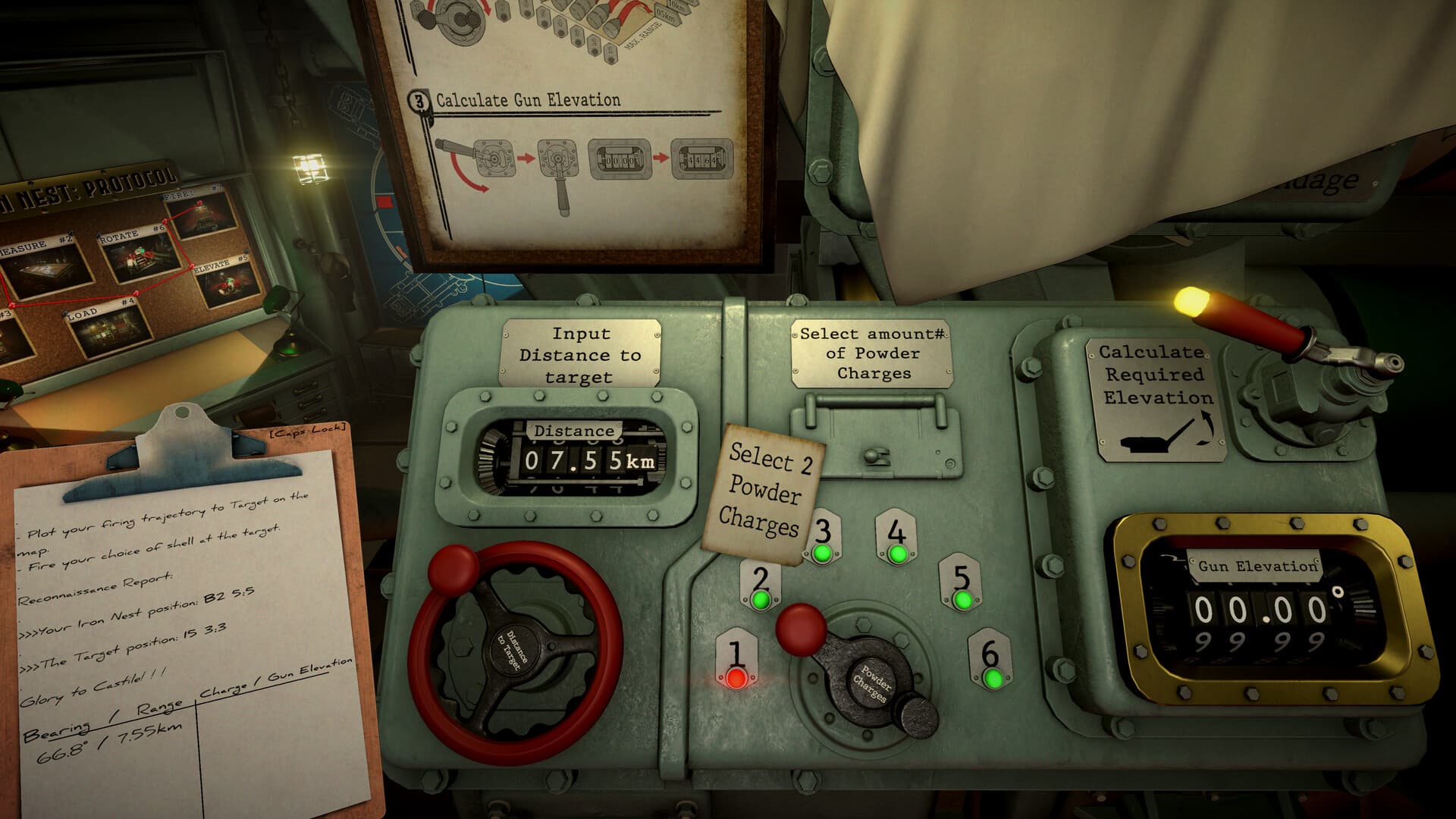
IRON NEST's ballistic calculator is a physical fire-control station that connects map measurement to gun elevation. It processes the relationship among ammunition type, target distance, propellant charge, and required gun elevation. Understanding this system is essential for every operator who wants to move beyond guesswork and achieve consistent first-round hits.
The calculator can process numbers, but it cannot verify that you measured the correct target, chose the right shell for the job, or loaded the physical gun correctly. Think of it as a transformation stage inside a longer chain — not as an oracle. This guide explains the complete calculator cycle, common failure modes, and how to troubleshoot when solutions that look correct still produce misses.
What the Calculator Does
The ballistic calculator transforms three inputs into one output:
- Shell type: AP, HE, SMK, HCHE, or other available ammunition
- Target distance: The range from Iron Nest to the target (not observer-to-target)
- Powder charge: Numbered charge positions that determine muzzle velocity
Output: Required gun elevation in degrees.
The official interface visibly includes a SHELL TYPE field, a target-distance input, charge selector lamps, and a mechanical counter labeled CALCULATED REQUIRED ELEVATION. Different shell cards display different charges and angles for the same target context, confirming that the calculator is shell-specific.
The calculator processes a relationship among ammunition, target distance, propellant charge and required gun elevation. It does not locate the target, choose the morally or tactically correct shell, traverse the turret or verify the physical loader.
Input 1: Shell Type
Set the exact current-build label before accepting an elevation. The calculator footage shows ammunition task cards labeled PGAS, TGAS, SMK, AP, STAR, and HCHE. If the field reads EMPTY or retains the previous shell, the rest of the output is not ready for use.
Community reports confirm that shell types appear in the calculator in alphabetical order, except EMPT which is first. HCHE appears just before HE. When changing shell type, archive the old solution and set the new type explicitly — cross-shell reuse is unsafe even without knowing the hidden formula.
Input 2: Target Distance
Distance must come from the current Iron Nest position to the accepted target point. It is not an observer-to-target range copied directly from a report. The tactical map system establishes the target from coordinates, bearings, or distance arcs — then you measure the final gun range from the turret.
Critical rule: If the turret relocates, remeasure. A world target can remain fixed while its range from the gun changes. Copy units and precision exactly as the current calculator expects.
Input 3: Powder Charge
The calculator shows numbered charge positions with indicator lamps. Higher and lower charges alter the trajectory, and the exact charge must match the elevation output. Do not reduce this relationship to “longer always means maximum charge.” A given range may support more than one arc or mission-specific option.
When changing charge, obtain or verify a new elevation. When changing shell, repeat both. The powder charges and elevation form an inseparable pair.
Output: Required Gun Elevation
The mechanical counter labeled CALCULATED REQUIRED ELEVATION is the calculator's primary visible output. Copy it to the correct gun's elevation control with the displayed precision. Do not confuse required elevation with current gun elevation — one is a computed instruction, the other is a physical state.
If left and right guns have independent controls, verify each side. A correct calculator output applied to the wrong gun is still an execution error.
The Complete Calculator Cycle
Follow this sequence for every shot:
- Confirm the active target and current turret position
- Copy the map-derived range with units
- Set the exact shell type
- Enter the target distance
- Select a valid charge according to the current system
- Run or read the calculation
- Record shell, range, charge and elevation together
- Apply charge and elevation to the same physical gun
- Recheck before firing
Why Calculator Solutions Can Still Miss
The calculator only knows its inputs. A precise elevation can be wrong for the operation because:
- The range came from a bad map plot
- The shell field is stale (wrong type selected)
- The physical gun carries another round
- The selected charge does not match the loader
- Incorrect elevation setting on the physical gun
- Wrong traverse or bearing
- Incomplete loading state
- Movement after calculation
Diagnose the chain in order rather than turning the calculator controls until a miss disappears. Classify the error first: lateral misses point to target plotting or bearing; range misses point to distance, charge, or elevation; wrong effect points to shell selection.
Movement and Stale Solutions
Turret movement invalidates the range and bearing measured from the old position. The shell type and target may remain unchanged, but the calculator input must be refreshed after the new location is known. Mark pre-movement solutions invalid rather than leaving them beside current values.
If emergency repositioning temporarily hides the new location, no reliable ballistic calculation can begin until position is re-established. This is an upstream geometry issue, not a calculator malfunction.
Precision and Rounding
Use the precision displayed by the current interface. Do not invent extra decimals from an external formula, and do not discard displayed precision casually. Physical controls may have their own readable increments. Record what was actually set — a later impact can only reveal a rounding pattern if the initial setting is known.
Pre-Fire Calculator Checksum
Before leaving the station, read back:
- Target identifier
- Current turret position or solution version
- Shell type
- Target distance and units
- Selected powder charge
- Required elevation
- Gun side that will receive the settings
Then confirm the physical gun matches. The checksum connects computation to machinery.
Understanding the Underlying Math
The developer has confirmed that the game uses a simplified linear formula rather than real ballistic physics. The community has derived the working relationship:
Elevation = Distance × 0.012 / Number of Charges
Where distance is in meters. For example, at 6,470 meters with 2 charges: 6470 × 0.012 = 77.64, then 77.64 / 2 = 38.82° elevation.
This simplified model means shells travel in a straight line for a fixed time based on charge count, rather than following a ballistic arc. The developer explained this choice: early development used the Paris gun as a base (55° maximum elevation, rounded to 60° for simplicity), and the system was built around that number. While real-world physics would place optimal range near 45° for shells of this size, the game's linear formula makes mental calculation possible and increases the skill ceiling for experienced operators.
The maximum range per charge follows a simple pattern: 1 charge = 5 km max, 2 charges = 10 km max, 3 charges = 15 km max, and so on. The maximum elevation is 60°. If your calculated elevation exceeds 60°, you need more charges.
Shell Type Availability
Shell types unlock through campaign progression. The calculator shows all available shells in alphabetical order (except EMPT first). You start with basic shells and unlock new types as you complete story missions. The shell type field is primarily for display and record-keeping — the calculator only needs distance and charge count to compute elevation. However, keeping the correct shell type selected ensures your firing cards contain complete information for rapid execution.
Frequently Asked Questions
Do I need to use the calculator for every shot?
No. Experienced operators can calculate elevation mentally using the formula above. The developer introduced the Gorge mission specifically to challenge players to operate without the calculator. However, the calculator remains the safest tool for precise shots under time pressure.
Why does 60° give more range than 45°?
Because the game uses a linear formula, not real ballistics. The developer admits this was a research mistake baked into the build — the Paris gun source claimed 58° maximum elevation, which was rounded to 60°. At this point, with the system already built, a full redesign is not feasible, so 60° stays.
Can I plan multiple shots in advance?
Yes. The calculator supports setting up multiple shell cards with different configurations. You can place cards of already-fired shots on the map for reference, and pre-plan up to six shots in advance. This is especially useful during volleys where you don't want to touch the map between shots.
What happens if I change charges after calculating?
You must recalculate. Charge and elevation are a coupled pair — one cannot change without the other. Firing with a different charge than the one used in calculation will produce a miss.
Does shell weight affect the calculation?
The pre-release Q&A discussed shell weight as a possible variable, but current official imagery does not confirm it as a visible input. Treat shell-weight handling as unverified unless the released build shows it explicitly.